How to comply with the GDPR rules for collaborator data deletion using PeopleSpheres
To ensure that the GDPR rules are followed, you can implement a series of rules via Monitoring.
There are two possibilities:
- Clients having subscribed before 09/24/2020.
- Clients having subscribed after 09/24/2020.
In both cases, you need to contact your PeopleSpheres Consultant or the Support Center for assistance:https://support.peoplespheres.fr/en/kb-tickets/new
- In both cases:
We have established two lists of fields affected by the mandatory data deletion when a collaborator quits the company.
These two deletions are based on the End of Employment - End of Employment date field. Complete this information carefully for your collaborators.
|
N+1 month from the End of Employment date |
N+5 years from the End of Employment date |
|
Why N+1 month? These are the personal fields that the company must delete after a collaborator quits the company. However, we recommend conserving this data for at least 1 month to manage unforeseen events, last minutes tasks, and eventual errors. |
Why N+5 years? There are some fields that must be conserved for 5 years in the personnel register and made available to the CSE. It is therefore mandatory to conserve such fields for 5 years. They can be deleted after this period. |
|
Concerned fields · Driving license · Family situation · Emergency contact · Dependent person · Profile photo · Personal address · Personal phone · Personal email address · Training |
Concerned fields · Last name · First Name · Username · Social security number · Date of birth · Transport · Bank account · Mutual insurance · Work permit |
 The fields listed here correspond to the standard fields proposed by PeopleSpheres: if you have specific fields, you need to decide to include them or not with the help of the consultant.
Why are some fields excluded?
Compensation, Nationality, Fiscal residence country... some fields may seem sensitive to be retained permanently.
You must remember that at the end of 5 years, a user record is completely anonymized. This information can be retained for future reports on users who have quit the company. These fields cannot be traced back to the user in question, as opposed to the Birth date or Social Security number fields, for example.
Implementation
- Clients having subscribed before 09/24/2020.
The first step will be "cleaning" PeopleSpheres of old profiles that are outdated.
To do this, create the first Rule.
Create Rule: enter a title and a description.
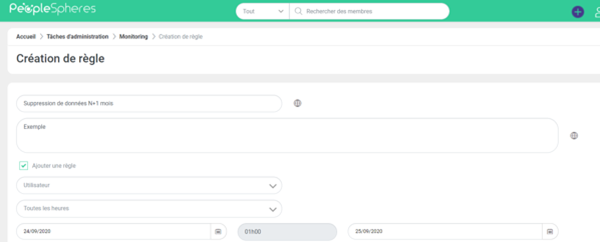
- Condition: End of Employment date is on or before up to 1 month before. E.g.: if today is 09/24/2020: End of Employment date is inferior or equal to 08/24/2020

- Rule: delete all fields mentioned in the table above (+ any other fields you want to include) by checking the History box.
Please note: you must have Data deletion permission in the assigned role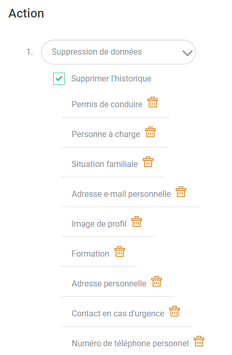
- Let the rule run for the next hour. E.g.: if it is 3:24 p.m. it is better to wait until 4:00 p.m. for the rule to have taken effect
We have now cleaned PeopleSpheres of the existing profiles.
This rule can now be configured to run permanently.
Go back to the created rule.
- Modify the hourly trigger to daily. Select a sufficiently distant end date.

- Modify the condition to ensure that the verification is: End of Employment date is X months after = 1.
- Save the rule.
Congratulations, you can now relax. The personal data of the collaborators will be deleted automatically 1 month after their departure.
You can redo this manipulation for the N+5 years. 5 years = 60 months if the condition is in months.
Clients having subscribed after 09/24/2020.
The first step will be to "clean" PeopleSpheres of old profiles that are already outdated.
To do this, create the first Monitoring.
- Create a Monitoring: enter a title and a description.
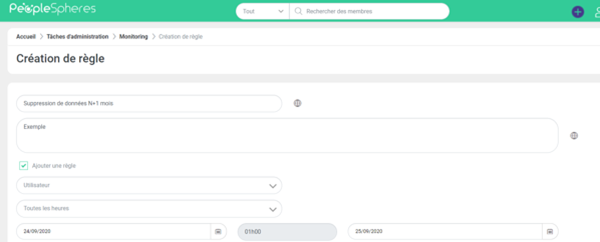
- Condition: End of Employment date is on or before up to 1 month before. E.g.: if today is 09/24/2020: End of Employment date is inferior or equal to 08/24/2020

- Rule: delete all fields mentioned in the table above (+ any other fields you want to include) by checking the History box.
Please note: you must have Data deletion permission in the assigned role.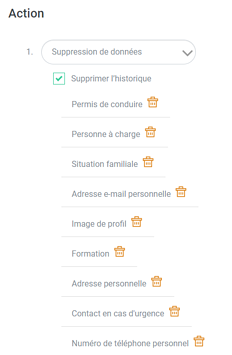
- Let the rule run for the next hour. E.g.: if it is 3:24 p.m. it is better to wait until 4:00 p.m. for the rule to have taken effect
We have now cleaned PeopleSpheres of the existing profiles.
You can delete this rule.
You can redo this manipulation for the N+5 years. 5 years = 60 months if the condition is in months.
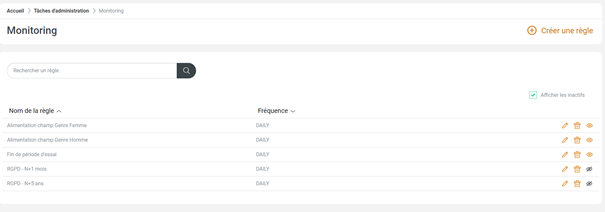
Activate the 2 default rules: GDPR - N+1 month and GDPR - N+5 years on your PeopleSpheres.
To do this, click on view inactive in Monitoring. Reactivate these 2 rules.