
Evaluations are used to measure training effectiveness. This guide will show you how to activate evaluations for different training items.
LEVEL 1 AND 3 EVALUATIONS
Evaluations are used to measure and record a learner's reaction to training they’ve recently completed, such as their rating of the course content, materials, and the relevance of the training.
Evaluations need to be activated for an event. Associating evaluations at the event level will associate that evaluation as a default to all sessions created for that event.
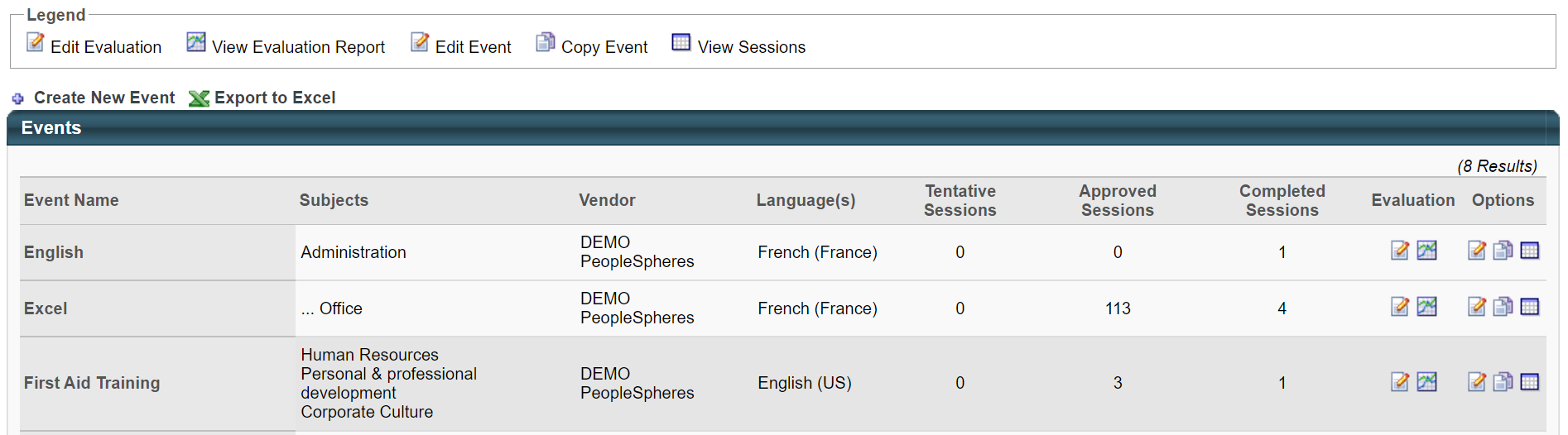
To associate your evaluation with the event, go to Manage Events and Sessions, and in the Evaluations column, click the crayon icon :
The following management options are available for evaluations attached to events or sessions:
- Active - Check the Active checkbox to associate an evaluation with an event or session.
- Required - Check the Required checkbox to make the evaluation required for session completion.
Required or not ?
Whether or not the evaluation is required will impact the status of the participant
after the roster has been submitted.
Not Required
On the last day of the training, the link "Evaluate" appears on the employee's transcript. The employee can then click on it to complete the evaluation.
When the Roster is submitted, the participant's status changes to "Completed", as does the "Evaluate" link. The evaluation can be launched from the "Completed" tab of the transcript.

Required
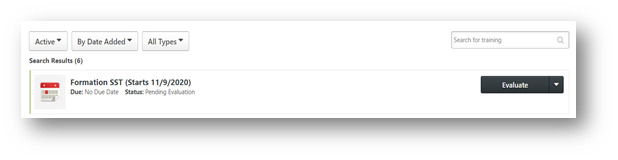
The course remains in the "Active" tab until the evaluation is completed or expires (30 days) even if the list of participants has been submitted. The evaluation can be started from the "Active" tab of the transcript, and from the learner's home page. The user has a status of "Pending Evaluation" until the evaluation is completed or expires.
- Preview - Preview the evaluation by clicking on the Preview icon .
- This will open the user view of the evaluation in a pop-up window.
- Select Evaluation - Change the evaluation by clicking the Select icon .
- Select the evaluation by clicking on the Add icon.

Click SUBMIT to submit your changes.

Good to know
The level 1 evaluation is triggered at the end of the session and expires after 30 days. After this time, it is no longer possible to complete it.
The level 3 evaluation is triggered and expires according to the defined settings. In the default model, the level 3 evaluation is triggered 180 days after the end of the training and expires 90 days after it is triggered.